
Time blocking is the method that assigns every activity of the day a dedicated block of time on the calendar, treating each block as an appointment with yourself. It isn't a new technique (it is one of the documented approaches to intentional time management), but it remains one of the most practical for anyone who works independently, runs a small team or coordinates dozens of team members.
Eurostat data on usual hours worked show that in Italy self-employed workers have longer weeks than employees: 41.5 hours vs. 36.2 in 2024, and 45.3 hours for those who have employees of their own [5]. There are no official surveys of how often those hours get broken up, but peer-reviewed research on the cost of context switching puts a price on it: every interruption takes minutes of recovery before you get back to your previous level of focus [2][3].
This article describes how time blocking works and how it differs from time boxing and the Pomodoro Technique, and it proposes a four-step protocol for building a day in blocks that can withstand the impact of reality. The final part covers the most common mistakes people make when they try the method for the first time.
Clearing up the terms: time blocking, time boxing and the Pomodoro Technique
Three terms that often overlap in the language of time management, but that work at different levels:
-
Time blocking vs. time boxing. Time boxing sets a maximum amount of time within which a task must be finished (an output constraint); time blocking allocates space in your calendar to the task (an input constraint). The two tools coexist: you can schedule a 90-minute block (blocking) and, inside it, set a 25-minute timer for the first sub-task (boxing).
-
Time blocking vs. daily schedule. The schedule collects what is already fixed: meetings, external deadlines, appointments. Blocking is the active planning of what you choose to protect as working time. The schedule receives; blocking decides.
-
Time blocking vs. the Pomodoro Technique. Pomodoro is a technique used inside the block (25-minute cycles with a break); time blocking is the technique that designs the day. Pomodoro lives inside a block; it doesn't replace it.
Protecting your time with blocks: how it differs from a to-do list
How many times a day do you come back to the same task after stepping away from it? If the answer is more than three, the problem isn't your to-do list: it's the structure of your day.
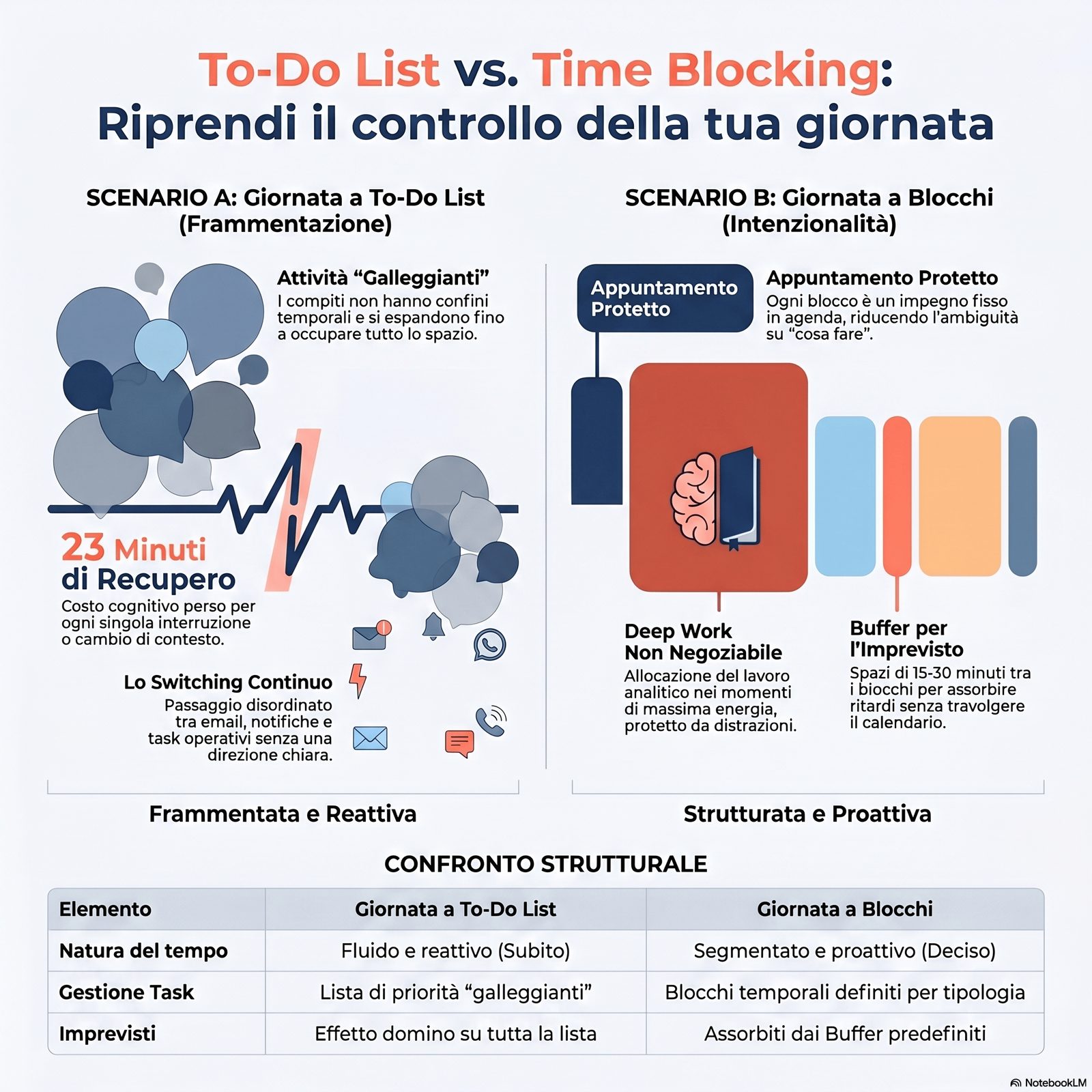
The difference between a day run by a to-do list and a day built in blocks isn't cosmetic. A to-do list orders tasks by priority but leaves them "floating" in time: each one expands to fill the space available. A block, on the other hand, states in advance how much time an activity deserves and where it goes.
Research by Mark and colleagues on the cost of context switching offers a concrete measure of the benefit. The CHI 2005 observational study of 24 knowledge workers found that after an interruption it takes an average of 25 minutes and 26 seconds to return to the original task [2]. The CHI 2016 study broadens the picture: frequent switching between activities is correlated with worse mood and lower perceived productivity [3]. These are not marginal effects: they add up over the day and determine the gap between hours worked and results produced.
In practice, the longer week of Italy's self-employed recorded by Eurostat [5] goes hand in hand with constantly alternating between operational, managerial and relational roles, often without structured boundaries.
The time block addresses this problem with a simple principle: treat every activity as an appointment with yourself. A block on the calendar doesn't move without an explicit reason, just as you wouldn't move a meeting with a client without telling them.
The 4-step protocol for building a day in blocks
Is a day in blocks without buffers still a day in blocks? The answer is no: without room for the unexpected, the first delay throws off the whole calendar, and the method gets filed away as "not right for my kind of work."
Building a day in blocks requires an ordered sequence of four decisions: honestly estimating how long each activity takes, grouping similar tasks, allocating the blocks on the calendar at the right times, and planning buffers for the unexpected. Skipping even one of these steps tends to recreate the fragmented day you wanted to avoid. Peer-reviewed literature on the planning fallacy and attention residue explains why each step is necessary [1][4].
Step 1: Honest estimate. For each recurring activity, you need to estimate the actual time it takes, not the time you'd like it to take. Research by Buehler, Griffin and Ross shows that the tendency to underestimate completion times is systematic and persists even with direct experience: even people who have done a task dozens of times tend to plan too optimistically [1]. An effective practice is to track the actual time of 5–10 recurring activities for a week and use it as the basis for future planning, instead of an intuitive estimate. For more on time estimation methods, the go-to read is Daily planning.
Step 2: Grouping. Bundling similar tasks into themed blocks (communication, analytical work, decisions, administration) reduces the cognitive cost of switching between different activities. The theoretical basis is the attention residue described by Leroy: when you switch activities, part of your attention stays hooked on the previous task, worsening performance on the new one [4]. Grouping tasks of the same type reduces how often these switches happen and lowers the overall cost.
Step 3: Allocation. Place the blocks at times of day that match your available energy: analytical work during your sharpest hours, communication and coordination during transition hours. There is no universal layout: choose it based on your personal rhythm and the type of work that dominates your day. For work that requires deep, uninterrupted focus, see Deep work: working in depth, where the idea of a focused work block finds a broader theoretical framework (Newport, 2016, is the popular reference source for time blocking applied to deep work, although the quantitative evidence comes from the studies by Mark and Leroy) [6].
Step 4: Buffers. Plan empty blocks, typically 15–30 minutes, between different activities, used only to pick up your train of thought again and absorb the unexpected. A buffer isn't wasted time: it's the margin that makes the day resilient to the planning fallacy [1] and attention residue [4]. Without buffers, the day is planned at maximum theoretical capacity and breaks at the first delay, which drags all the following blocks with it.
An example of a typical day. A day in blocks for a business owner with a team of 5–10 people might look like this: 8:30–10:30 analytical work block (non-negotiable); 10:30–10:45 buffer; 10:45–12:00 communication and coordination (email, Slack, updates); 12:00–12:15 buffer; 2:00–3:30 p.m. meetings and decisions (blocked in an afternoon window); 3:30–4:00 p.m. administration and follow-up; 4:00–4:15 p.m. review of the day and preparation of the next day's blocks. The specific layout should be adapted to your context, not copied: what transfers is the principle (estimate + grouping + allocation + buffers).
How to adapt blocks to meetings, urgent issues and team members
Which blocks can't be moved under any circumstances? The answer to this question defines the difference between a calendar that protects your work and a calendar that is at its mercy.
Time blocking works easily on an isolated day of writing or analysis, but a business owner's reality is full of external meetings, urgent decisions and requests from team members. The question isn't whether to give up on the method, but how to make it permeable to the unpredictable without losing its protective function.
Three practices help you keep structure and flexibility together:
Negotiable and non-negotiable blocks. Not all blocks carry the same weight. Blocks dedicated to analytical work or critical deadlines can be declared non-negotiable: they aren't moved without an explicit, documented reason. Communication and administration blocks, on the other hand, are negotiable: they can be shortened or moved if an unexpected priority comes up. Make this distinction in advance, not under the pressure of the moment.
Availability windows for the team. An effective practice is to announce your "office hours" to the team: predefined windows in which you can be interrupted for requests, updates or decisions. Outside these windows, requests get queued. Research by Mark and colleagues shows that after each interruption it takes an average of 25 minutes and 26 seconds to get back to the task [2]: announcing availability windows isn't a way of isolating yourself, but a measure that protects the working capacity of the whole day, including for the person making the request. For more systematic strategies for handling interruptions, a complementary read is Managing interruptions at work.
Explicit escalation rules. Not all urgent issues are the same. Setting clear criteria in advance for what counts as a real emergency, and can therefore interrupt a non-negotiable block, reduces perceived pressure and the number of actual interruptions. Ambiguity about what "urgent" means is one of the main reasons non-negotiable blocks get broken anyway. For complementary techniques for organizing your day, see How to organize your day; for a broader overview of time management techniques, Time management techniques.
Common time blocking mistakes and how to spot them early
How many times a week does the "catch-all block" end up fuller than the one dedicated to your main work? When the answer is "often," the problem isn't time blocking: it's that it hasn't really been applied yet.
Time blocking almost always fails for the same reasons. Recognizing these patterns in advance lets you step in before the method is abandoned as unworkable.
1. Blocks that are too long, without breaks. Three hours in a row without a pause don't increase focus: they dissolve it. The warning sign is finding it harder and harder to keep your train of thought in the second half of the block. The fix is to add internal cycles of focused work (e.g., 45–50 minutes of work + 10 minutes of break) inside the longer blocks.
2. Systematic underestimation. Planning the day as if every task took the theoretical minimum ignores the planning fallacy documented by Buehler and colleagues [1]. The warning sign is that blocks regularly overrun and swamp the ones that follow. The fix is to use the actual times you've tracked (see Step 1) instead of optimistic estimates.
3. Zero buffers. Without margins between blocks, attention residue between different activities builds up and gradually worsens performance over the course of the day [4]. The warning sign is a growing sense of confusion as you move from one task to the next, with trouble remembering where you left off. The fix is to add explicit buffers, not as breaks but as cognitive transitions.
4. The "catch-all block." Leaving a generic "misc/urgent" block tends to turn it into the container where everything ends up: unplanned requests, forgotten follow-ups, postponed decisions. The warning sign is that the catch-all block is always full and keeps getting pushed forward. The fix is to dismantle it: every activity that lands there should find an appropriate themed block the following week.
5. Rigidity without review. Applying the same block layout week after week, without ever comparing estimated time with actual time, means not learning from experience. The warning sign is that the planned day and the day you actually live diverge systematically and repeatedly. The fix is to spend 15 minutes at the end of the week reviewing your blocks: what held up, what gave way, what needs resizing.
Limits and conditions for applying the method
Time blocking offers measurable benefits in managing fragmentation, but it has limits worth recognizing.
The method is most effective when the business owner or professional has discretion over how their day is organized. In contexts with high external dependency, where meetings, client requests and other people's decisions take up most of the time, the room for applying it shrinks significantly. In these cases it is realistic to apply time blocking to only part of the day (e.g., the first two hours of the morning), not to the whole calendar.
The 4-step protocol requires a calibration period: the first two or three weeks are for collecting real data on how long activities actually take, and results improve as estimates become more accurate. Expecting immediate benefits exposes you to the risk of abandoning the method before the learning curve is complete.
Finally, time blocking is not a solution to work overload: if the volume of activities structurally exceeds the time available, organizing the day in blocks doesn't solve the problem; it makes it more visible. In this case the priority is to review the workload, not the method.
Frequently asked questions
Does time blocking work if you have a lot of meetings? It works, but only partially. When meetings take up more than 60–70% of the day, the space for blocks of independent work shrinks drastically. In these contexts, it makes sense to apply time blocking at the edges of the day (before or after the meeting block) and, in parallel, work to reduce the number of unnecessary meetings.
How many blocks can you manage in a day? There is no universal number. As a practical guideline, a day with 3–5 distinct blocks (including buffers) is more sustainable than one with 8–10 short blocks. Too much granularity recreates the fragmentation the method is supposed to reduce.
Do you need a specific digital tool for time blocking? No. Time blocking works with any calendar, digital or paper, as long as the blocks are visible and treated as appointments. Digital tools offer the advantage of a weekly view and easy editing, but the choice of tool is secondary to the discipline of applying the method.
Key takeaways
Time blocking is applied in four sequential steps: track the actual time of recurring activities, group tasks by type, allocate blocks at times of day that match your energy rhythm, and add buffers between different blocks. The distinction between negotiable and non-negotiable blocks, along with announcing availability windows to the team, makes the method compatible with the complexity of day-to-day management. The most common mistakes (underestimating time, no buffers, the catch-all block, rigidity without review) get corrected over time, provided you set aside a weekly review of the gap between the planned day and the day you actually lived.
Time blocking isn't a method for filling your day, but for deciding in advance what deserves protection and what doesn't. The four steps of the protocol (honest estimate, grouping, allocation, buffers) aren't sequential steps to carry out just once: they are a weekly cycle that gets sharper over time, as the difference between planned and actual time becomes visible and correctable.
Peer-reviewed data on the cost of context switching and on attention residue provide a scientific framework for why blocks work [2][3][4]: reducing the fragmentation of the day produces a measurable cognitive gain, even before an organizational one. To place time blocking within the broader system of time management, the go-to read is the pillar article Time management for business owners; to dig deeper into deep work within the longer blocks, see Deep work: working in depth.
A day built in blocks isn't a fuller day; it's a more intentional one. The business owner who adopts the method consistently starts to recognize, at the end of each week, where their time was actually invested: in aggregate, it's the difference between a calendar that records what happened and a calendar that helped decide what happens.
Sources and references
-
Buehler, R., Griffin, D., & Ross, M. (1994). Exploring the "Planning Fallacy": Why People Underestimate Their Task Completion Times. Journal of Personality and Social Psychology, 67(3), 366-381 — https://doi.org/10.1037/0022-3514.67.3.366
-
Mark, G., Gonzalez, V. M., & Harris, J. (2005). No Task Left Behind? Examining the Nature of Fragmented Work. Proceedings of the SIGCHI Conference on Human Factors in Computing Systems (CHI '05), 321-330 — https://doi.org/10.1145/1054972.1055017
-
Mark, G., Iqbal, S. T., Czerwinski, M., Johns, P., & Sano, A. (2016). Neurotics Can't Focus: An in situ Study of Online Multitasking in the Workplace. Proceedings of the 2016 CHI Conference on Human Factors in Computing Systems, 1739-1744 — https://doi.org/10.1145/2858036.2858202
-
Leroy, S. (2009). Why is it so hard to do my work? The challenge of attention residue when switching between work tasks. Organizational Behavior and Human Decision Processes, 109(2), 168-181 — https://doi.org/10.1016/j.obhdp.2009.04.002
-
Eurostat. Average usual weekly hours worked in the main job by professional status, full-time/part-time employment and occupation [lfsa_ewhuis], 2024 data — https://ec.europa.eu/eurostat/databrowser/view/lfsa_ewhuis/default/table
-
Newport, C. (2016). Deep Work: Rules for Focused Success in a Distracted World. Grand Central Publishing. [Secondary popular source; the main quantitative evidence comes from Buehler et al. 1994, Mark et al. 2005 and 2016, and Leroy 2009.]