
Introduction
A freelancer opens her laptop at nine with a notebook full of yesterday's notes and doesn't know where to start. A small business owner uses three different apps — one for the team, one personal, one on the phone — and every time he looks for a task he finds it in the wrong place. The leadership team of a mid-sized company ends the week with a list of seventy-five open items, half of them assigned to others, and no longer remembers who is doing what. In none of the three cases is time the problem; what is missing is a system for reducing the noise.
A to-do list is the written list of activities to carry out, organized according to a criterion. The key word is "criterion": an unordered collection of items is not an effective to-do list, it is a personal mailbox in disguise. A list works when it frees up working memory [1], makes an explicit choice about "what to do first," and gets closed within a reasonable time.
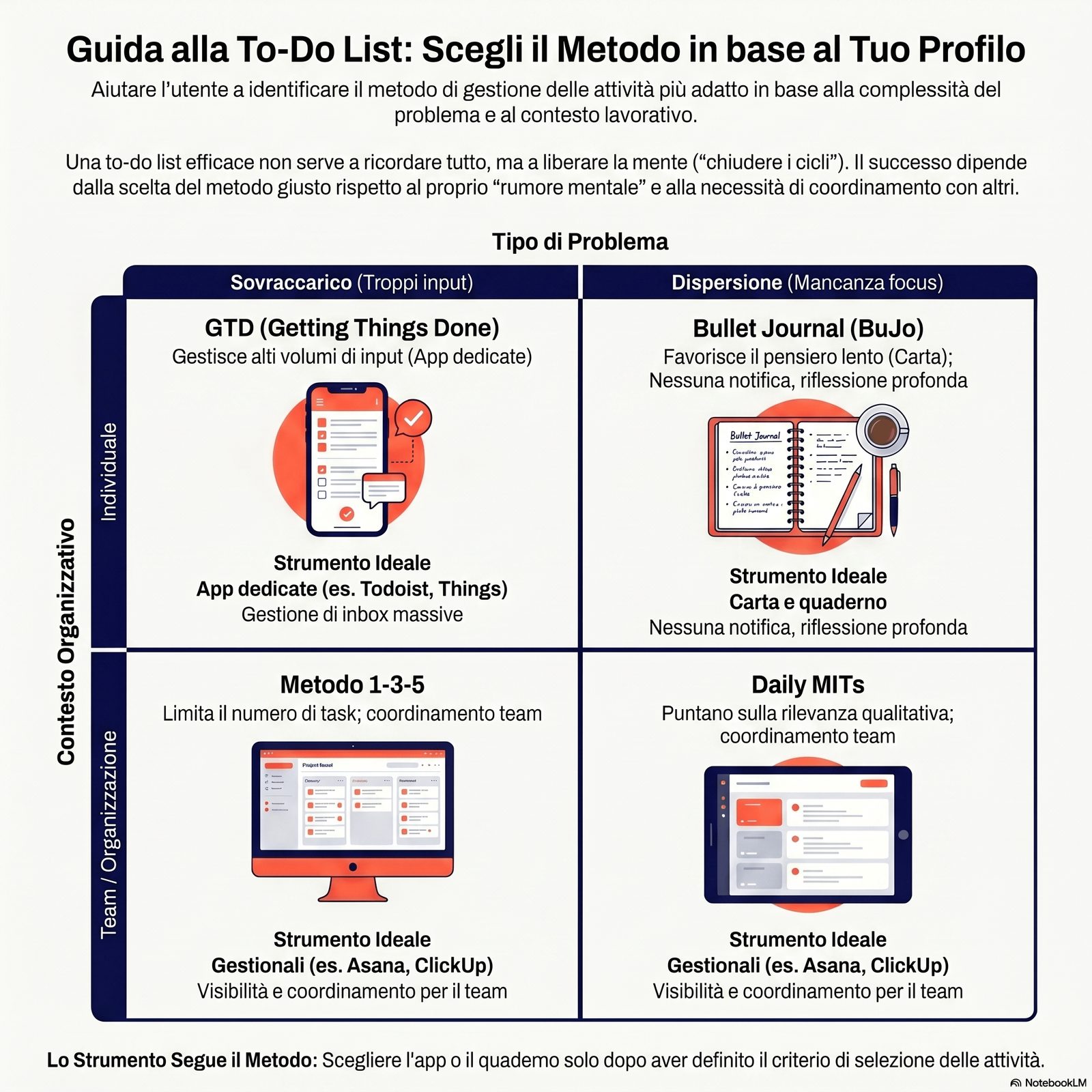
The following pages compare four established methods — David Allen's GTD, Ryder Carroll's Bullet Journal, the 1-3-5 method and Daily MITs (Most Important Tasks) — with the strengths, typical use cases and limits of each. You will find a short comparison table and a map by tool category (paper, general-purpose apps, dedicated apps, integrated management software). The goal is not to point to the "right" method, but to provide criteria for choosing the one that fits a given work profile.
Designing a to-do list that frees up memory instead of taking up attention
The to-do list has a well-documented cognitive function: reducing the interference of unfinished tasks with working memory. A series of experiments published in 2011 showed that simply formulating a written plan attenuates the Zeigarnik effect — the mind's tendency to keep returning to open tasks [1]. This section defines what makes a list "effective" before comparing the methods: writing down items is not enough, a few specific conditions have to be met.
Is a list that captures everything really more useful than a list that forces you to choose? The experimental evidence suggests the opposite of what people tend to think: the list works when it gets closed, not when it contains everything.
Before the definition, three terms that readers confuse with "to-do list" deserve a clear boundary. The calendar is the tool for the flow of time: it blocks activities into fixed time slots. The to-do list lists what to do, the calendar when to do it. They are often used together, but they are different tools. The planner (paper or digital) combines a calendar and free-form notes: a to-do list can live inside a planner, but a planner is not in itself a to-do list. Weekly or monthly planning works on a longer decision horizon: it establishes what needs to be done in a week or a month. The to-do list is the daily execution of planning already done, not the planning itself. The backlog is a non-sequential reservoir of ideas, future activities and intentions: you don't execute the backlog in order, you draw from it to populate the day's or the week's to-do list.
An effective to-do list has three minimum characteristics: each item is a concrete action (not a topic or an area), it has an estimated duration and an execution context, and the list as a whole gets closed within the session it was built for (a day or a work block). When even one of these three conditions is missing, the list becomes an archive of intentions, not an execution tool.
The core idea of this section: the list doesn't work because it remembers, it works because it frees the mind from the job of remembering. Every method evaluated in the following sections should be judged by how much mental noise it reduces, not by how complex the system is.
Read next: daily planner.
Learn to use GTD to turn every input into a next action
GTD (Getting Things Done) is a method born in the early 2000s and formalized in 2015 in its revised edition [4]. Its promise is specific: bring the mental load down to zero by turning every input — an email, a phone call, an idea — into a clear next action or into an archived note. The five phases (capture, clarify, organize, reflect, engage) are simple to list and less simple to sustain over time. It is worth looking at them not as a sacred procedure, but as a sorting protocol that can be applied even outside the original book.
What happens if every morning someone shows up with a new request that doesn't fit into any ongoing project? Without an explicit sorting protocol, it ends up in memory — and memory, by the third request, stops being reliable.
The five phases of the method, translated into everyday business practice:
Capture. Everything that grabs your attention is captured in a single collection point (a physical inbox, a digital document, a notes app). The goal is to empty your mind: no item stays "in your head." The email from the accountant, the supplier's request, the idea for the new service — everything goes into the same inbox.
Clarify. Each item in the inbox is processed according to one question: "Is it an action?" If not, it is deleted, filed as reference or incubated as a future idea. If yes, you clarify what the concrete next action is (not "manage the Rossi account," but "call Mr. Rossi to confirm Friday's delivery").
Organize. Next actions are assigned to context lists (things to do at the office, on the phone, waiting for others, for upcoming projects). Projects that require more than one action are recorded as such.
Reflect. Once a week — this is the linchpin of the method — you review the entire system: you empty the inbox, update the lists and check the progress of projects. Without this weekly review, GTD gradually collapses.
Engage. You choose what to do based on context, available energy and current priorities. The decision is easier because the system has already processed every input.
The scientific evidence for the mechanism: Masicampo and Baumeister (2011) [1] show that formulating a written plan for a goal not yet completed reduces the Zeigarnik effect. GTD is the operational codification of this principle at scale.
Main limit. The learning curve is steep: the first weeks require an investment of attention to build trust in the system. Skipping the weekly review, even once, tends to trigger a process of degradation of the system. GTD is the method with the most power and the highest maintenance cost.
If you want to dig deeper into the link between input management and productivity, the reference is the cluster on information flow management.
Building a functional Bullet Journal even if you don't have time to draw
The Bullet Journal was created in 2013 by an American designer, Ryder Carroll, who was looking for an analog system to manage his own attention [5]. The original codification is minimal: a notebook, a pen and a shared notation for tasks, events and notes ("rapid logging"). The "aesthetic" version that spread on social media is not the method, it is a visual interpretation of it. For a business owner or a professional, the question is not whether they can draw, but whether they need an analog tool to think slowly before exposing themselves to the digital world.
For someone who spends eight hours in front of a screen, is writing a list by hand an inefficiency or a protection? Research on attention suggests that the switch between analog and digital is not neutral, but it is rarely discussed by those who choose the app first.
The heart of the method is rapid logging: a concise notation that visually distinguishes tasks (•), events (○) and notes (—). Each item is jotted down quickly the moment it comes up, without building elaborate structures. The three time levels of the minimal BuJo:
- Future Log. A six-month view where you note distant commitments and deadlines. It is not a detailed calendar: it is a map of fixed future commitments.
- Monthly Log. At the beginning of each month, you move what is relevant for the current month from the Future Log and add the rest. The monthly list works as a collection point.
- Daily Log. Every day, a page (or half a page) with the day's tasks, events and notes. At the end of the day, you "migrate" what wasn't completed: you note it for the next day or send it back to the Monthly Log if it isn't urgent. If it isn't worth migrating, you cross it out — which is an effective way to dismantle false priorities.
Typical use case. People who alternate strategic and operational thinking and want to separate "slow thinking" from the digital flow. The physical act of writing imposes a selection that fast typing doesn't require.
Main limit. The BuJo is by definition an individual tool: it isn't easily shared with the team. It lends itself to the business owner's personal use, not to the operational coordination of the organization.
Deciding every day what goes on the list: the 1-3-5 and Daily MITs methods compared
The length of the daily to-do list is not a personal preference: it has a measurable effect on attention. Studies on knowledge worker performance show that a list that isn't closed within the day increases exposure to interruptions and self-interruptions, with consequences for errors and completion time [2]. Two simple methods try to solve the same problem in different ways: 1-3-5 fixes the number of items allowed, Daily MITs fix the relevance of the items. It pays to understand their logic before choosing one.
Is a fixed-number list (1-3-5) or a variable-relevance list (MITs) better? It depends on the type of mistake you make most often: overload, or procrastinating on the things that matter.
The 1-3-5 method: a fixed structure with nine items in total
The structure is simple and binding: every day 1 big item (a task that requires sustained concentration or has a high impact), 3 medium items (important but not heavy tasks), 5 small items (quick, administrative or maintenance tasks). Maximum total: 9 items.
Core idea. The structure prevents the list from swelling because the number is given and not negotiable. People who tend to overload their day find in the numerical constraint a structural brake that personal discipline cannot guarantee.
Use case. Profiles with a strong tendency to overload (a business owner who struggles to say no, a freelancer with many small clients) and days with a relatively uniform structure.
Limit. The "big/medium/small" classification is subjective and requires frequent recalibration. The fixed number doesn't adapt to days that are very different from one another: a day full of meetings doesn't lend itself to the same structure as a day of independent work.
Daily MITs (Most Important Tasks): a few items, chosen for relevance
Every morning you select 1 to 3 relevant activities to complete before touching the rest of the list. The selection is qualitative, not quantitative: you don't count the number, you assess the relevance.
Core idea. People who already have a capture system (e.g., a backlog or GTD) need a daily selection protocol, not a complete system. Daily MITs provide that selection immediately.
Comparison with 1-3-5. The two methods are not alternatives to GTD or the BuJo: they are complementary. They answer the question "what goes on today's list," not "how do I capture inputs" (GTD) or "how do I organize the notebook" (BuJo).
| Method | How it is built | When to use it | Typical limit |
|---|---|---|---|
| 1-3-5 | Fixed structure: 1+3+5 items by size | Tendency to overload, uniform days | Subjective classification; rigidity |
| Daily MITs | 1-3 items by relevance, chosen every morning | A capture system already exists | Requires an explicit "relevance" criterion |
Comparing methods and tool categories without being led by the app of the moment
A to-do list doesn't live in a vacuum: it lives inside a tool. The choice of tool is not neutral with respect to the method, and context data suggest that the jump from paper to digital is not yet uniformly complete among smaller Italian companies [6]. There is no "best overall" tool: there is the tool that suits a work profile. This section offers a comparison table of the four methods and a map by tool category — analog, general-purpose app, dedicated app, integrated management software — to guide the choice without promoting a specific vendor.
Does the tool determine the method, or does the method determine the tool? In practice the tool already in use tends to win — and that is why many to-do lists don't work: they are in the wrong place.
Comparison table of the four methods:
| Method | Problem it solves | When to use it | Typical limits |
|---|---|---|---|
| GTD | Cognitive overload from unsorted inputs | High volume of mixed inputs (emails, requests, ideas) | Learning curve; ongoing maintenance |
| Bullet Journal | Difficulty "slowing down" before going digital | Individual work, alternating between thinking and doing | Can't be shared with the team |
| 1-3-5 | Tendency toward daily overload | Uniform days, numerical constraint is useful | Subjective classification; rigid |
| Daily MITs | Procrastination on relevant activities | A capture/backlog system already exists | Requires an explicit relevance criterion |
Map by tool category:
Paper and notebook. Suits the BuJo and individual Daily MITs. Offers the advantage of the analog step (handwriting, slowing down in the selection, no notifications). Can't be shared with the team without friction.
General-purpose apps (notes, spreadsheets). Suit 1-3-5 or Daily MITs for people who don't want to learn a dedicated app. Flexibility is an advantage but also a risk: without structure, a note becomes an unmanaged backlog.
Dedicated apps (category). Suit GTD because of the volume of inputs: they offer an inbox, context labels and review systems. The risk is adopting an app because it's trendy rather than for the problem it solves.
Integrated management software (category). Suits cases where the to-do list has to be coordinated with the team and projects, not just with the individual. The individual to-do list integrates with the team's lists, reducing scattering. It requires an investment in configuration and team training.
The selection criterion is not the tool with the most features: it is the tool that actually gets checked, every day, without friction. According to ISTAT (the Italian National Institute of Statistics) data on the adoption of digital tools in businesses, integrated management software is used by 48.8% of small and medium-sized Italian companies compared with 85.9% of large companies, and data analysis tools by 41.9% compared with 83.6% [6]: in smaller companies, the shared tool remains the exception rather than the rule.
Read next: activity scheduling.
Recognizing the mistakes that turn a good to-do list into a confusing archive
Even a well-chosen method fails if it is applied badly. Research on knowledge workers describes patterns of self-interruption that arise when the inbox or the task list becomes an unfiltered second brain [3]. Three mistakes recur in most to-do lists that stop working: confusing the list with an archive, mixing different horizons in the same list, and never closing a review cycle. Recognizing them is worth more than choosing the method.
When was the last time you truly emptied your to-do list, every item included? A list that grows endlessly is not a list: it is a personal answering machine that only talks to the person who writes in it.
Mistake 1 — The list as an archive, not an execution tool.
An item stays on the list even after weeks without progress: it is no longer a task, it is a worry. Mark and colleagues (2016) [3] describe how patterns of self-interruption intensify when lists are loaded with "pending" items — the cognitive load is proportional to unresolved items, not to completed ones. The fix is a periodic (weekly) review that forces a decision on every item that has been on the list for more than 7 days: do it, delegate it or delete it.
Mistake 2 — Mixing horizons in the same list.
Items for today, commitments for next week, vague ideas for next year: in the same list, they have a paralyzing effect. The reader doesn't know where to start because they don't know which time horizon they are reading for. The fix is to physically (or digitally) separate three levels: the daily list (closed within the day), the weekly list (closed by Friday), the backlog (no deadline, checked during the weekly routine).
Mistake 3 — Skipping the review phase.
All four methods include a review moment: migration in the BuJo, the weekly review in GTD, the daily reset in 1-3-5, the morning selection in Daily MITs. Skipping the review turns any list into a neglected archive. The fix is to treat the review as a fixed appointment, not as an optional activity.
Mistake 4 — Using the same list for yourself and for the team.
A business owner who puts both their own tasks and the ones they have assigned to the team on their personal to-do list produces a hybrid system that works poorly in both directions. Your own system manages your own decisions and actions; coordinating the team requires shared tools with public visibility. The fix is to separate the two functions into distinct tools or clearly separated sections. For managing your personal list within a broader system, the reference is priority management; for the working method that integrates the to-do list with overall organization, the reference is the effective working method.
Limits and conditions of applicability
The four methods described in this article were developed in English-speaking contexts for individual knowledge workers. Their application to smaller organizations is qualitative: the documented cognitive mechanisms (the Zeigarnik effect, the cost of interruption, attention residue) are general, but the details of application depend heavily on the type of work, the number of team members and the organizational structure.
GTD in particular is designed for environments with a high volume of mixed inputs: it can turn out to be over-structured for profiles with few recurring tasks and low variability. The BuJo is individual by definition and doesn't scale to team contexts.
Choosing the method doesn't solve the upstream problem of prioritization: knowing how to manage a list presupposes knowing what to put on it. The reference for the preceding phase is priority management.
FAQ
Do you need to use a single method, or can you combine them? The methods are not mutually exclusive if they are combined at different levels. GTD for the incoming flow + Daily MITs for daily selection is a common and consistent combination. The only combination to avoid is using two parallel systems for the same function (e.g., two competing inboxes).
Which method is best for someone starting without an existing system? Daily MITs are the entry point with the least friction: they require a single decision every morning and no existing infrastructure. From Daily MITs you can move to GTD when the volume of inputs grows.
How much time does each method take to maintain? The daily BuJo takes 5-10 minutes. 1-3-5 and Daily MITs take 3-5 minutes in the morning. GTD requires the weekly review (30-60 minutes) plus daily inbox processing (variable, but typically 15-30 minutes). The total cost should be weighed against the expected benefit of each method.
Operational summary
An effective to-do list is not a list that remembers everything: it is a list that lets the mind stop remembering. There is only one condition: every item has an explicit destination (do, delegate, file, delete) and the list gets closed within an expected time. The four methods compared solve different problems — GTD sorts high volumes of inputs, the BuJo slows you down before going digital, 1-3-5 constrains quantity, MITs constrain relevance. The choice of tool follows from the method, it doesn't precede it.
Conclusion
An effective to-do list is not a list that remembers everything: it is a list that lets the mind stop remembering. There is only one condition, and it plays out in four different methods: every item has an explicit destination (capture, do, delegate, file) and the list gets closed within an expected time.
The four methods compared — GTD, Bullet Journal, 1-3-5 and Daily MITs — are not ideological alternatives. They solve different problems: GTD sorts high volumes of inputs, the BuJo slows you down before going digital, 1-3-5 constrains quantity, MITs constrain relevance. The choice of tool (paper, general-purpose app, dedicated app, management software) follows from the method, it doesn't precede it.
If you want to frame the to-do list within the broader relationship between time, decisions and business, the pillar on time management for business owners is available; for the preceding phase — choosing what to work on before putting it on the list — the dedicated guide is priority management; if you want to go deeper into the execution techniques that make it possible to close items, read time management techniques.
A desk with a few items chosen every morning and closed every evening produces more value, more inner slowness and fewer mistakes than a desk with a hundred open items. This is not a symbolic result: it is the same number of hours, organized so that it leaves room for thinking.
Sources and references
[1] Masicampo, E. J., & Baumeister, R. F. (2011). Consider it done! Plan making can eliminate the cognitive effects of unfulfilled goals. Journal of Personality and Social Psychology, 101(4), 667-683. DOI: 10.1037/a0024192
[2] Bailey, B. P., & Konstan, J. A. (2006). On the need for attention-aware systems: Measuring effects of interruption on task performance, error rate, and affective state. Computers in Human Behavior, 22(4), 685-708. DOI: 10.1016/j.chb.2005.12.009
[3] Mark, G., Iqbal, S. T., Czerwinski, M., & Johns, P. (2016). Email duration, batching and self-interruption: Patterns of email use on productivity and stress. Proceedings of the ACM CHI Conference on Human Factors in Computing Systems, 1717-1728.
[4] Allen, D. (2015). Getting Things Done: The Art of Stress-Free Productivity (revised ed.). Penguin Books, New York.
[5] Carroll, R. (2018). The Bullet Journal Method: Track the Past, Order the Present, Design the Future. Portfolio/Penguin, New York.
[6] ISTAT (2025). Imprese e ICT — Anno 2025. Statistiche Report, Istituto Nazionale di Statistica, Roma. https://www.istat.it/comunicato-stampa/imprese-e-ict-anno-2025/