
The scene is familiar. A freelancer opens their laptop at eight in the morning and finds dozens of emails, two work WhatsApp groups that were busy overnight, three requests on LinkedIn. The owner of a small business walks into the office and, before even sitting down, has already run into four people with four questions, a messaging channel that keeps flashing, a door that is always open. The owner of a larger organization opens their calendar and sees a cascade of meetings where the people in cc outnumber the actual participants.
"Information flow" is precisely this: the daily stream of inputs — emails, messages, documents, meetings, notifications — that runs through the day of anyone who runs a business and competes for their mental space. It is not about the content of communications, it is about their architecture: who gets in, through which channel, how often, with what priority.
This article explains why an unmanaged information flow has a cost measured by research, which rules structure the three main channels (email, chat, meetings) differently, how to build a perimeter that reduces inputs without cutting you off from your team, and which common mistakes undermine even the most reasonable methods.
This is not about applying inbox zero as a universal recipe. It is about no longer putting up with a pace dictated by electrons and returning to a pace dictated by the work.
Design your information flow before chasing inbox zero
Most people looking for solutions to the "email avalanche" are actually looking for solutions to a broader problem. Inbox zero is a technique that works on a single channel; information flow is the system of overlapping channels — and you can empty your inbox every evening without your day becoming one minute more productive. Defining information flow as an architecture rather than as an inbox is the first operational shift.
How many times a day is real work interrupted by a notification that, in hindsight, did not deserve the interruption? For people who run a business, the average answer often runs into double digits — and the count usually stays invisible.
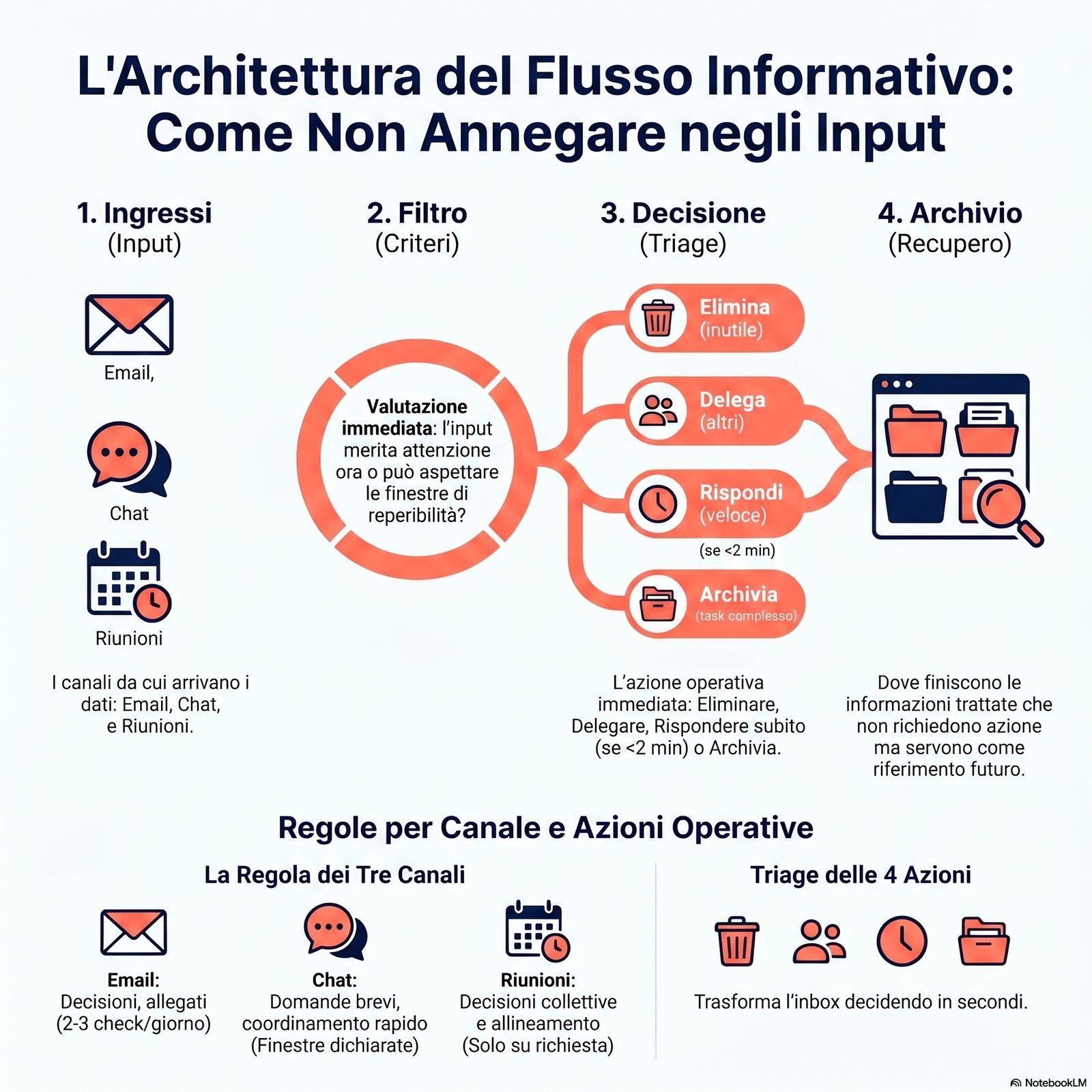
In operational terms, information flow is a system made up of four components: inputs (the channels inputs arrive through), the filter (the criteria that decide what deserves attention and when), the decision (the action — reply, delegate, file, delete) and the archive (where information goes that does not require immediate action but might be needed later). When one of the four components is missing or poorly designed, the whole system suffers what Renaud, Ramsay and Hair call perceived overload: the volume of input felt as unsustainable, regardless of the actual volume [5].
Data on the digitalization of Italian companies confirm the relevance of the issue: according to ISTAT's 2024 survey on ICT in enterprises, tools for remote meetings are used by 47.3% of Italian companies with 10–249 employees, compared with 96.3% of those with at least 250 employees [6]. Even where adoption remains partial, the new channel adds to those already in use rather than replacing them: more channels active at the same time does not mean more effective communication — it means a more complex information flow, which requires an explicit architecture.
It is worth distinguishing four concepts that readers tend to confuse with managing information flow:
- Internal communication: concerns the content circulating in the team (what is communicated, in what tone), not the architecture of the flow (when, from where, how often). You can have excellent internal communication with a chaotic information flow, and vice versa.
- Deep work: the mode of focused work that a well-managed flow protects. It is not a synonym: deep work is the effect, managing the flow is the structural cause that makes it possible.
- Productivity: a broader concept, of which managing information flow is one of the levers. Reducing information overload is a necessary but not sufficient condition for well-rounded productivity.
- Knowledge management: concerns storing and retrieving knowledge over time (where you file what, how you retrieve it). Managing the flow concerns how inputs move through in real time.
Calculate the cost of a pace dictated by email, chat and notifications
Two independent studies, conducted on knowledge workers in real-world settings, converge in measuring the cost of an unmanaged flow. The first — A Pace Not Dictated by Electrons by Mark, Voida and Cardello (2012) — removes email for five days from a group of thirteen participants and observes a measurable reduction in constant switching between different activities [2]. The second — Bailey and Konstan (2006) — measures in the lab the cognitive cost of a single notification: longer completion times, higher error rates and a worse emotional state when a task is interrupted compared with when it is carried out without interruptions [4]. Together, these studies establish one point: an unmanaged flow is not a perceived annoyance, it is a loss of performance associated with documentable behavioral patterns.
If research shows that removing email increases concentration, why does keeping it open all day remain the default? Because the cost of an unmanaged flow is invisible at the moment you pay it — and visible only at the end of the day, when "nothing important got done".
The 2016 study by Mark et al. adds physiological data to these observations: how often people open their inbox is positively associated with perceived stress and negatively associated with self-reported productivity [1]. Participants who opened their email more often during the day showed higher stress levels than those who checked it in more compact windows.
This evidence should be put in context: the studies cited were conducted mainly on knowledge workers in North American and Northern European settings. Transferability to other contexts and to smaller businesses is not automatic, but the underlying cognitive mechanism — the cost of interruption and of switching between tasks — is general enough to justify applying the same time-protection logic. The evidence points to an association between how often email is checked and stress; it does not support claiming direct causation or a precise quantitative measure that transfers to any context.
Three channels, three rules: how to treat email, chat and meetings differently
Treating email, chat and meetings as if they were the same thing is the main source of overload. They are channels with different expected response times, different types of content, different cognitive costs. A 2015 randomized study shows that limiting email checking to three times a day reduces participants' stress in a statistically significant way compared with a control group that could access their inbox freely [3]. Chat has different dynamics. Meetings are different again. Governing the three channels with separate rules is the difference between being subjected to a flow and directing it.
Is there a communication channel with a notification you haven't opened yet right now? Probably — and that is exactly the one that should be checked in fixed windows, not "whenever".
Email — asynchronous by nature: it does not require an immediate reply, but it creates the expectation of a reply within the working day. Research by Kushlev and Dunn [3] — a randomized experimental study of 124 participants, observed for two weeks under alternating conditions — indicates that checking at a fixed frequency (three times a day) is associated with significantly lower stress levels than checking at will. The content suited to email: communications that require reflection, attachments, decisions that need a written record. The content that should not go through this channel: real emergencies, conversations that take more than three exchanges.
Chat and instant messaging — synchronous by convention, but often used asynchronously. The cognitive cost of each notification is documented by Bailey and Konstan [4]: an interruption by notification increases the completion time of the task in progress and worsens the worker's emotional state, regardless of how important the message is. The content suited to chat: short questions, quick updates, immediate operational coordination. The content to move elsewhere: decisions that require reasoning, detailed feedback, filing critical information. The most effective measure is not eliminating notifications, but setting declared availability windows instead of implicit constant availability.
Meetings — a high-intensity synchronous channel. Every unnecessary meeting consumes not only the time it takes, but also the preparation time and the time needed to recover attention afterward. The topic of effective meetings is covered in detail in the dedicated article on effective business meetings. Here it is enough to establish the principle: meetings are the channel with the highest cognitive cost and should have the most selective entry criteria — not the other way around, as happens in many organizations.
| Channel | Expected response time | Checking frequency | Suitable content | Content to move elsewhere |
|---|---|---|---|---|
| Within the day | 2–3 times a day | Decisions, attachments, written record | Emergencies, long conversations | |
| Chat | Within 1–2 hours during working hours | Declared windows | Short questions, quick coordination | Detailed feedback, filing |
| Meetings | Scheduled slot | On request, with criteria | Collective decisions, alignment | One-way updates (→ email) |
Build a perimeter without isolating yourself: filter protocols your team accepts
The instinctive reaction to overload is to put up a wall: mute notifications, close the door, block the calendar for two hours. It works for a day. By the third day the team finds another way to reach the business owner, usually a worse one. A perimeter that lasts is not a wall, it is a protocol: explicit access rules that the team understands and accepts, because people don't feel shut out. Building a perimeter like this takes three coordinated moves.
Does your team interrupt you often because they really need to, or because they don't know when they will get an answer? Often the latter — which means the problem is not the perimeter, it's the fact that it was never declared.
Move 1 — Declare your availability windows. Muting notifications is not enough: you need to tell the team when you are available and when you can't be interrupted. This can be done through a status indicator in the chat, a visible block in the shared calendar, or an explicit rule agreed with the team (for example: "from 9 to 11 I don't reply to messages, I reply in the 11:30 session"). The declaration turns a perceived absence into an expected one.
Move 2 — Define the rule for a real emergency. Most interruptions are not urgent in the technical sense of the term — they are urgent for the person interrupting, not necessarily for the person being interrupted. It is wise to set, and share with the team, an operational definition of a "real emergency": an event that requires a decision within the next two hours, with documentable consequences if the decision doesn't come. Everything else can wait for the declared availability window. For more on how to tell urgent from important, see the article on managing commitments.
Move 3 — Reserve a "red" channel for emergencies. The red channel is a single point of contact — a direct phone call, a message with an agreed prefix, a color code in the chat — that the team uses only when the emergency is real and verified. Its existence ensures that the perimeter is not isolation: in a real emergency, there is always a way to reach the business owner within a few minutes.
Inbox triage in four actions: turn your inbox from enemy into tool
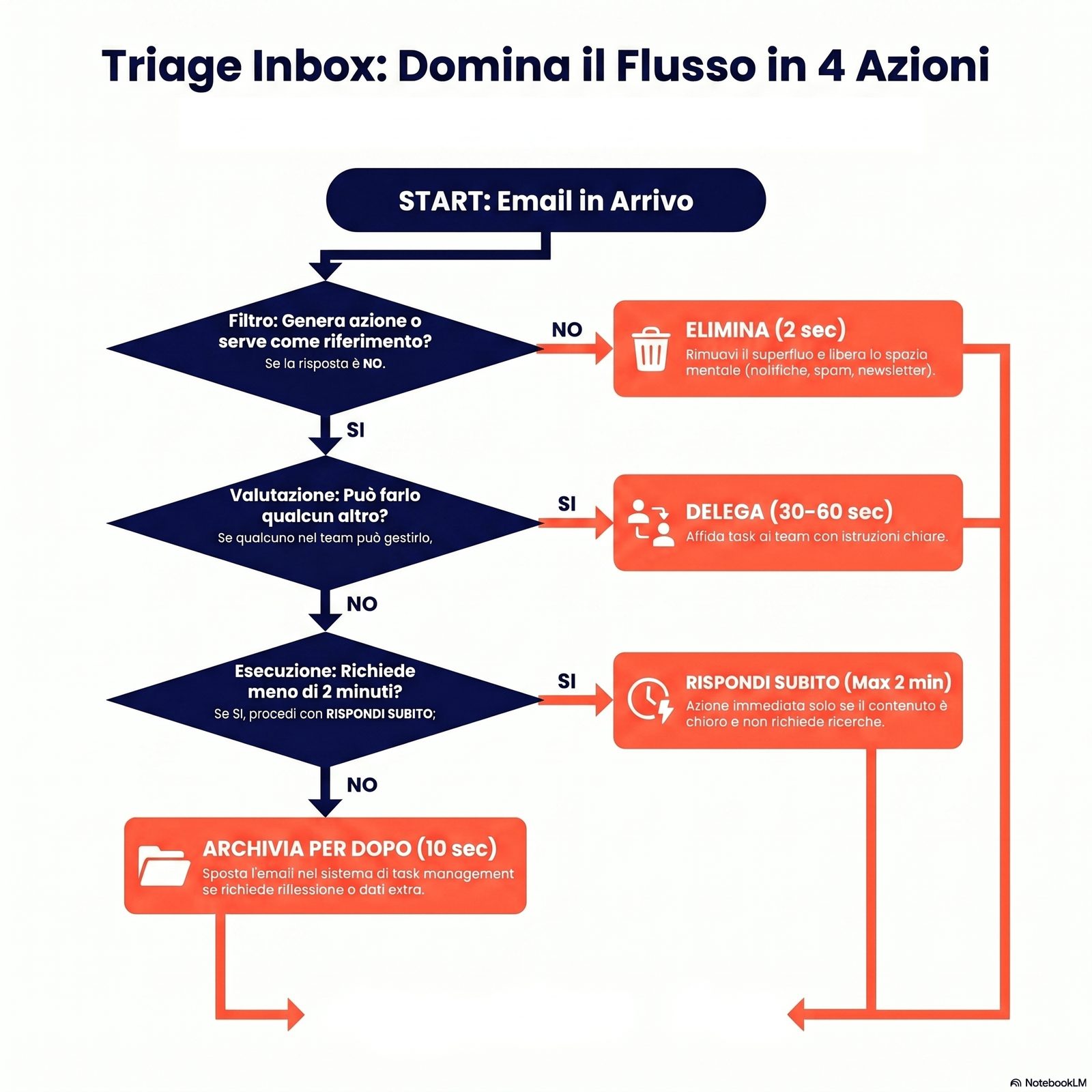
An inbox doesn't empty by reading. It empties by deciding. Every incoming message belongs to one of four operational categories, and each category requires a different action within a few seconds. Four-action triage — delete, delegate, reply now, file for later — is the mechanism that separates people who go home with their inbox still open from those who close it and deal with it the next day. It works if the four actions are fixed, not "more or less".
Faced with an email you have opened three times and still not dealt with, how many times was it really "read" and how many times was it just "endured"? For most of the emails that stay in the inbox, the answer tends toward "endured several times, read zero times".
The four triage actions, with criteria for applying them:
Action 1 — Delete (time: 2 seconds). Applies to: automatic notifications, unsolicited newsletters, promotional emails, informational messages that require no action. Criterion: if it doesn't lead to action and isn't useful as a future reference, delete it on the first pass.
Action 2 — Delegate (time: 30–60 seconds). Applies to: emails that require an action someone else can carry out. The message is forwarded with clear instructions, then filed. Criterion: if someone on the team can handle it, it doesn't go on the business owner's personal list.
Action 3 — Reply now (time: 2 minutes at most). Applies to: emails that require a short reply that can be completed in the same triage session. If the reply takes more than two minutes of thought, it doesn't belong in this category. Criterion: reply immediately only if the content is already clear and the reply doesn't require gathering additional information.
Action 4 — File for later (time: 10 seconds). Applies to: emails that require a more elaborate action, which should be planned as a task in your operational list. The message is moved to a "to handle" folder or the task is captured in your task management system — as described in the guide to an effective to-do list. Criterion: if it takes more than 2 minutes or additional information, it leaves the inbox and goes into the task management system.
This approach matches what Renaud, Ramsay and Hair [5] identify as "proactive" email behavior: the user decides what to do with each message instead of letting the message decide when and how much space it takes up.
Common mistakes that undo even a good protocol
Most information flow management protocols don't fail because the method is wrong. They fail because they run into a few systematic, recurring mistakes that hollow out the system from within in a matter of weeks. Recognizing them before you start reduces the chances of giving up.
Is a method abandoned after ten days a wrong method or a method applied badly? Often the latter — and often because of one of three or four mistakes that keep coming back in the same forms.
Mistake 1 — Muting notifications without declaring availability windows. An undeclared perimeter makes the team anxious: team members don't know when they will get an answer and start using alternative channels, often more intrusive ones. The fix is to pair every period of silence with an explicit statement of when you will be available.
Mistake 2 — Using chat as a record of decisions. Decisions made in an instant messaging thread get lost as the history scrolls by and have to be tracked down or remembered. The fix is to move formal decisions to a channel that supports search and filing (email, a shared document, a project management tool), using chat only for real-time coordination.
Mistake 3 — Confusing a fast reply with a useful reply. Replying to an email in three minutes with an imprecise answer triggers a second round of emails. Replying in two hours with a complete answer closes the thread. The fix is to separate how fast you acknowledge the message (stated to the sender) from how fast you give the final answer (which depends on how complex the content is).
Mistake 4 — Accepting meetings into your calendar without entry criteria. Every unnecessary meeting is a block of hours taken away from individual work. The fix is to set an explicit criterion for accepting or declining invitations: does the meeting require a collective decision or an alignment that cannot happen asynchronously? If the answer is no, the alternative is a shared document or an email.
Limits and conditions of applicability
The operational framework described here is based on research conducted mainly on knowledge workers in English-speaking and Northern European settings. Some conditions limit its applicability:
- Industries with regulated availability: in some industries (customer service, healthcare, security), constant availability is a contractual or regulatory requirement, not a choice. The protocol described does not apply in these contexts without significant adaptation.
- Organizations that need synchronous communication: in teams that work in shifts or in shared physical spaces, the asynchronous logic of email and availability windows requires more coordination than described here.
- Individual variability: the study by Renaud et al. [5] documents systematic differences between "reactive" and "proactive" users in their email behavior. Shifting from a reactive to a proactive style requires an adjustment period that can vary significantly from person to person.
- Causation not demonstrated: the documented associations between how often email is checked and stress levels [1] [3] do not imply direct causation. Contextual factors (type of role, organizational culture, workload) influence the observed results.
Frequently asked questions
How many times a day is it reasonable to check email? The study by Kushlev and Dunn [3] indicates that three times a day (morning, lunchtime, afternoon) is associated with significantly lower stress levels than continuous checking. The exact number depends on the type of work and the industry, but the principle — fixed windows instead of constant checking — can be generalized.
How do you handle customers who expect an immediate reply? A customer's expectation of an immediate reply is often implicit, not stated. Many customers have no problem accepting a response time of a few hours, as long as it is communicated explicitly ("I reply to emails by 5 p.m. every working day"). Stating your response time is more effective than staying constantly available — and it reduces the customer's uncertainty instead of feeding it.
Is inbox zero a useful goal? Inbox zero — having an empty inbox at the end of the day — is an emergent result of systematic triage, not a goal to chase for its own sake. Pursued as an end in itself, it can lead to hasty replies or to filing messages before they have been properly handled. It is useful as an indicator that the system is working, not as a primary metric.
How do you get your team to adopt the same channel rules? The starting point is making your own rules transparent and predictable, not imposing the same rules on others. A business owner who declares their availability windows and sticks to them consistently indirectly models the team's behavior. Collective adoption of channel rules requires an explicit moment of alignment — a short meeting or a shared document — in which the rules are discussed and agreed on.
Operational summary
Managing information flow means designing the architecture through which inputs come in, get filtered, receive a decision and are filed. It is not about the content of communications, it is about their structure in time and across channels.
The three main channels — email, chat, meetings — have different expected response times, cognitive costs and suitable content: treating them with the same rules produces overload. Research indicates that how often email is checked is associated with perceived stress [1] [3], and that every interruption by notification has a measurable cognitive cost on the task in progress [4].
Four-action triage (delete, delegate, reply now, file for later) and a perimeter declared to the team are the operational tools that turn the flow from something you endure into something you govern. The perimeter lasts if it is explicit, not if it is silent.
Conclusion
The key point of this article is easy to state and hard to apply: you don't control information flow by opening your inbox faster, you control it by changing the architecture of your channels. Email, chat and meetings have different timing and rules; the perimeter holds when it is declared, not when it is imposed in silence; four-action triage turns an inbox you endure into a working tool. Peer-reviewed research has indicated for more than a decade that limiting how often you check email is associated with less stress, and that every notification has a higher cognitive cost than it seems at the moment it arrives.
If you want to read further, two complementary directions help stabilize the system described: the link between protecting your time and deep work clarifies why the perimeter is essential, while the practical guide to managing interruptions goes into detail on how to handle unscheduled inputs. The pillar article on an effective work method brings these levers together into a broader framework.
A business where information flow is governed does not become less communicative: it becomes a business where decisions reach their destination, deadlines hold, and the day of the person leading it once again has a pace dictated by the work, not by electrons.
Sources and references
[1] Mark, G., Iqbal, S. T., Czerwinski, M., Johns, P., & Sano, A. (2016). Email Duration, Batching and Self-interruption: Patterns of Email Use on Productivity and Stress. Proceedings of the 2016 CHI Conference on Human Factors in Computing Systems (CHI '16), 1717-1728. ACM.
[2] Mark, G., Voida, S., & Cardello, A. V. (2012). "A Pace Not Dictated by Electrons": An Empirical Study of Work Without Email. Proceedings of the 2012 CHI Conference on Human Factors in Computing Systems (CHI '12), 555-564. ACM.
[3] Kushlev, K., & Dunn, E. W. (2015). Checking email less frequently reduces stress. Computers in Human Behavior, 43, 220-228.
[4] Bailey, B. P., & Konstan, J. A. (2006). On the need for attention-aware systems: Measuring effects of interruption on task performance, error rate, and affective state. Computers in Human Behavior, 22(4), 685-708.
[5] Renaud, K., Ramsay, J., & Hair, M. (2006). "You've Got E-Mail!" … Shall I Deal With It Now? Electronic Mail From the Recipient's Perspective. International Journal of Human-Computer Interaction, 21(3), 313-332.
[6] ISTAT (2025). Imprese e ICT — Anno 2024. Istituto Nazionale di Statistica, press release of January 17, 2025. https://www.istat.it/comunicato-stampa/imprese-e-ict-anno-2024/