
Introduction
Every year, thousands of Italian companies install new project management software. A significant share abandons it within a few months, sometimes going back to Excel spreadsheets or email. Not because the product was flawed, but because the choice followed market noise instead of real operating criteria.
The scenario is familiar to anyone who leads an organization of any size. The freelancer juggling three clients at once ends up with overlapping deadlines and decides they need "a system." The business owner of a company with about ten people watches the team exchange dozens of messages a day to coordinate a single project and starts looking for a tool. The business owner of a more structured company, with multiple teams and simultaneous projects, tries to centralize everything on a single platform. Three different situations, the same fork in the road: which tool to adopt.
A project management tool is software that lets you plan activities, assign responsibilities, track deadlines and visualize the progress of one or more projects in a way that is shared among the people involved. The definition excludes simple individual task trackers and enterprise management systems, which serve different needs and are distinguished later in this article.
This article offers a reasoned comparison: not a feature-by-feature list of products, but a map of selection criteria followed by a summary table of the most common tool families. The goal is to give you what you need to decide, not to crown a winner.
Public statistics do not measure the adoption of project management software separately, but they place the digital intensity of Italian companies below the European average: in 2024, 23.3% of Italian companies with at least ten employees reached a high level of digital intensity, compared with 27.1% for the EU-27 average [2]. Part of this gap is structural, but part of it comes from poor choices that generate resistance, abandonment and a return to less suitable tools. Understanding the selection criteria is the first step toward closing this gap.
Preparing the choice: why many companies adopt the wrong tool
How many of the companies that adopted a project management tool in the last three years are still using it in a structured way? The answer is surprising: the selection phase matters more than any product feature, and almost no one approaches it methodically.
Most project management tools installed in companies are chosen through word of mouth, an eye-catching demo or a sponsored post seen online. ISTAT data show that in 2025, 56.0% of Italian companies with at least ten employees used management software [1], but how many teams are still actually using the tool after six months is not tracked by any public statistic. Understanding why there is a gap between formal adoption and real use is the starting point for a choice that works.
The core idea of this section: the selection phase is worth more than the product's features. Skipping it is the leading cause of failure.
Italy's position in business digital intensity, measured by Eurostat with the Digital Intensity Index, remains below the EU-27 average, and the gap widens as the required level rises: in 2024, 23.3% of Italian companies with at least ten employees reached a high level, compared with 27.1% in the EU-27, and 3.9% reached a very high level, compared with 7.2% [2]. The OECD lists digitalization among the three factors holding back innovation-driven growth in Italy, together with the employment weight of low-productivity micro-enterprises and low spending on research and development [4].
The barriers that come up most often in Italian companies that give up on an advanced digital tool are three: difficulty integrating with existing systems, the perceived costs of onboarding, and staff training. No Italian public survey measures them for project management tools alone; the closest ISTAT figure concerns artificial intelligence, where a lack of adequate skills holds back almost 60% of companies that evaluated the investment but then did not make it [1]. These barriers are partly objective and partly the result of poor choices in the initial evaluation process.
Three signals that a company is ready for a PM tool.
Not every stage of a business justifies adopting a structured tool. Three operating signals suggest the time is right:
Signal 1 — Volume of concurrent projects. When you run more than two or three projects in parallel, with different people involved in each, coordination via email and chat becomes a source of errors and wasted time. A PM tool makes visible what would otherwise stay implicit in conversations.
Signal 2 — Number of people involved in a single project. Above three or four people, informal management of responsibility almost invariably creates ambiguity: "I thought someone else was handling it." A tool that explicitly assigns activities, deadlines and responsibilities reduces this kind of friction.
Signal 3 — Average project length of more than four weeks. Short projects can be managed with lightweight tools. When a project runs longer than a month, tracking progress, managing dependencies and communicating with stakeholders require a tool with more structure.
Learning to tell a PM tool apart from what looks like one (and why the boundary changes everything)
Is the tool you are evaluating really a PM tool, or is it a task tracker dressed up as one? The difference shows up after the purchase, when the team stops using it because it was not what they needed.
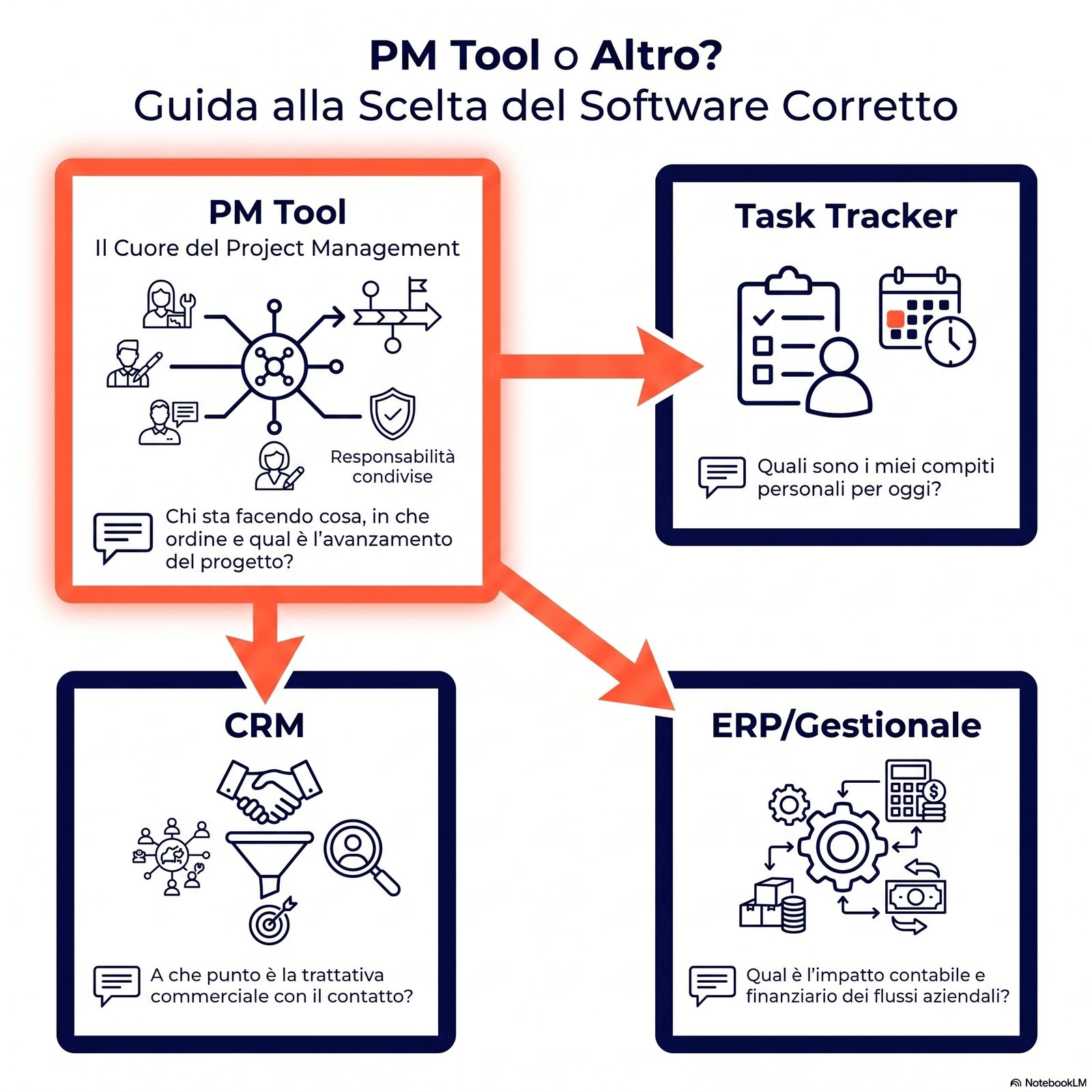
It often happens that a company looks for a project management tool and ends up buying a task tracker, a CRM or a management system. The confusion arises because many software products list "project management" among their functions, even when they were built for another purpose. Knowing where the boundary lies prevents bad purchases and the frustration of a team asked to coordinate with a tool designed to do something else. Four practical distinctions clarify what a PM tool is and what it is not.
PM tool vs task tracker (e.g., Todoist, Things).
Typical confusion: both manage "things to do." A task tracker is a subcategory that manages personal lists of individual tasks; a PM tool coordinates several people on a shared project, with dependencies, distributed responsibilities and timelines visible to everyone. If the main question is "what do I need to do today?", you need a task tracker. If the question is "who is doing what, in what order, and how far along is the project?", you need a PM tool.
Practical clue: if the tool does not let you assign an activity to another person and see at a glance all the project's activities assigned to different people, it is not a PM tool.
PM tool vs CRM (e.g., HubSpot, Salesforce).
Typical confusion: both track "things that are happening." A CRM manages customer relationships and sales pipelines (leads, opportunities, contracts); a PM tool manages the execution of internal projects, which may or may not include customers as stakeholders.
Practical clue: if the tool is centered on contacts, opportunities and the sales cycle, it is a CRM. If it is centered on activities, deadlines and the progress of a project with a beginning and an end, it is a PM tool.
PM tool vs ERP / management system (e.g., integrated accounting systems).
Typical confusion: many ERPs claim to include a "project management" module. An ERP integrates accounting, inventory, invoicing and HR; the ERP's PM module is often a secondary feature with less flexibility than a dedicated tool. Adopting the ERP as the primary PM tool is justified only if the project is tightly integrated with accounting and procurement flows.
Practical clue: if the team running the project needs to access the platform for non-accounting reasons, the ERP is probably excessive or inadequate.
PM tool vs documentation tool (e.g., company wiki).
Typical confusion: both "store information about the work." Documentation stores knowledge (procedures, decisions made, operating guides); a PM tool coordinates action (who does what, by when, with what status). A wiki has no sense of "progress" toward a goal; a PM tool is structurally oriented toward closing activities.
Practical clue: if the tool is used mainly for writing and reading, it is documentation. If it is used mainly for assigning, tracking and completing, it is a PM tool.
A 6-criteria checklist for choosing a project management tool that actually works
Does the next tool you are about to buy really meet the 6 criteria, or only the "everyone uses it" criterion? Changing the order of priorities in the evaluation also changes the product you end up choosing.
Before looking at the features of a single product, it pays to define the criteria you will judge it by. Adoptions that stall share two elements that no feature comparison table highlights: how complicated the tool feels to the people who have to use it every day, and how closely it fits the workflow the team actually follows. Six criteria, applied in the right order, produce an evaluation that holds up over time.
Criterion 1 — The specific problem solved.
Before any other evaluation: what kind of project do you actually manage? A communications agency running monthly campaigns has different needs from a consulting firm planning multi-year projects. The tool must fit the prevailing type of project — not a hypothetical future case, but your current operating reality.
Question to ask: "If this tool disappeared tomorrow, which specific difficulty would immediately come back?"
Criterion 2 — The size of the team involved.
Every tool has a team size it is optimally designed for. Tools built for teams of 3-5 people become hard to manage with 30; enterprise tools are overkill for small teams. Team size is also a cost variable: per-user licenses on rapidly growing teams can become significant.
Question to ask: "In 18 months, how many people will use this platform?"
Criterion 3 — An acceptable learning curve.
Research on introducing technology into organizations — conducted on health and care programs in the United Kingdom, not on business management software — lists among the recurring causes of abandonment precisely a tool that requires complex knowledge to use, inside an organization that cannot shift to the new way of working [3]. A powerful but hard-to-learn tool produces more resistance than efficiency in the first weeks — and if it does not get past that critical phase, it gets abandoned. The question is not "how many weeks does it take in theory?" but "how many weeks can the team afford to be underproductive during the break-in period?"
Question to ask: "Could a person with no specific training use the tool's basic functions within two hours of exploring it on their own?"
Criterion 4 — Total cost (not just the license).
The cost of a tool does not end with the monthly or annual license. You also need to account for: the team's onboarding time (quantifiable in person-hours), the possible cost of migrating data from previous tools, maintenance and updates, and the opportunity cost of a wrong choice that requires a new selection after six months. The perceived costs of training and integration are among the barriers most often cited by Italian companies, even though public surveys measure them for digital adoption as a whole and not for project management tools alone [1].
Question to ask: "Including the team's time, how much does adopting this tool really cost in the first year?"
Criterion 5 — Lock-in and data portability.
What happens if, twelve months from now, you decide to change tools? Some tools make it easy to export all data (activities, projects, history) in standard formats; others create dependencies that turn migration into a project of its own. Lock-in is rarely declared during evaluation, but it becomes evident — and expensive — the moment you try to leave.
Question to ask: "Can all data be exported in CSV or JSON format without going through paid technical support?"
Criterion 6 — Integration with the existing system.
A PM tool lives in an ecosystem: email, calendar, invoicing, document sharing, video conferencing. A tool that does not integrate with the tools already in use creates manual updating work that quickly becomes unsustainable. Integration should be evaluated not only in theory (how many connections the tool offers) but in practice (how many of those connections are native and how many require third-party tools).
Question to ask: "Does this tool connect natively with the tools the team already uses every day?"
For a closer look at the process automation that PM tools support, see the article on business process automation.
Comparing the 6 most common families of project management tools in business
Which family does the tool your team uses today belong to, and which family should it belong to? Often the distance between the two answers alone explains the coordination inefficiencies.
There is no such thing as "the best project management tool": there are product families that solve different problems. Recognizing which family a tool belongs to — even before the product name — simplifies the decision. Six families cover most of the cases a growing business runs into.
Methodological note: the products mentioned are examples of each family, not recommendations. No vendor is an authoritative source for this article. Cost data are qualitative (low/medium/high) to avoid information that becomes outdated within a few months.
Summary comparison table
| Family (example) | Problem solved | Team size | Indicative cost | Learning curve | Data portability |
|---|---|---|---|---|---|
| Visual kanban (e.g., Trello) | Visual flow for simple projects | 1-15 | Low | Low | High |
| Lightweight collaborative suites (e.g., Asana) | Multiple projects, distributed teams | 5-50 | Medium | Medium | Medium |
| Work-OS platforms (e.g., Monday) | Custom workflows, extensive customization | 10-100+ | Medium-high | Medium-high | Medium |
| All-in-one suites (e.g., ClickUp) | Unifying tasks, docs and goals | 5-100 | Medium | High | Medium |
| Hybrid notes+tasks workspaces (e.g., Notion) | Documentation + light management | 1-50 | Low-medium | Medium | Medium |
| Microsoft 365 suite (e.g., Planner) | Organizations already on the MS ecosystem | 10-500 | Included | Low (if MS already in use) | High (within MS) |
Visual kanban: when a simple board is exactly what you need.
The strength of this family is simplicity: a board with columns (To do / In progress / Done) and cards representing activities. It is the easiest family to adopt and the one with the lowest abandonment rate in the first weeks. Its limit is scalability: when projects become complex, with dependencies between activities and teams on several levels, the visual board becomes hard to read.
It doesn't work when: you manage projects with a complex hierarchical structure (subtasks, multiple dependencies, formal milestones) or when you need automatic progress reports.
Lightweight collaborative suites: the balance point between structure and speed.
This family adds a more articulated structure to the visual logic: timelines, multiple assignment, progress dashboards, automatic notifications. It is the most common choice among companies that have moved past informal management but do not yet need enterprise infrastructure.
It doesn't work when: the team needs to deeply customize workflows or integrate the tool with complex management systems.
Work-OS platforms: customization and the risk of over-engineering.
The advantage of these platforms is flexibility: you can build custom workflows, create automations and integrate multiple data sources. The risk is complexity: the more configurable the tool, the more time and skill it takes to set up correctly. More configuration options also mean more ways to configure it badly, and without someone overseeing the initial setup the platform stays half-built and ends up being used as just another task list.
It doesn't work when: the team has no internal point person dedicated to configuring and maintaining the system.
All-in-one suites: the illusion of "everything in one place."
The idea of unifying tasks, documents, goals and communication in a single environment is appealing. The limit is that each function tends to be less polished than a specialized tool: task management is less powerful than a dedicated tool, documentation is less structured than a specialized wiki.
It doesn't work when: the team already has a set of specialized tools that work well and do not integrate easily with the all-in-one tool under consideration.
Hybrid notes+tasks workspaces: documenting and coordinating in the same environment.
For teams that produce a lot of content (agencies, consulting firms, editorial teams) while also managing projects, combining documentation and tasks in a single space reduces switching between tools. The limit is the maturity of the task module: often less structured than a dedicated suite.
It doesn't work when: projects require advanced progress tracking, dependency management or formal reports for external stakeholders.
Microsoft 365 suite: the advantage of already being in the ecosystem.
For organizations that already use Microsoft 365 (email, calendar, Teams, SharePoint), the built-in PM tools (Planner, Project) offer a native integration advantage that reduces adoption friction. The marginal cost is often zero or low. The limit is rigidity: these tools are designed for the Microsoft ecosystem and lose part of their value outside it.
It doesn't work when: the team uses a different ecosystem (e.g., Google Workspace) or needs advanced features that Microsoft does not include in its basic plans.
The most common mistakes in choosing a project management tool (and how to avoid them)
How many of these five mistakes were made the last time your company chose a tool? Even three out of five are enough to explain why the tool was never truly adopted.
The five mistakes below do not come from a statistical survey — none measures abandonment of project management tools alone — but from observing how these choices are typically made. They are not product mistakes but decision-process mistakes. Recognizing them before you choose — or stopping repeating them when you consider switching tools — significantly reduces the risk of finding yourself, six months later, back on Excel spreadsheets.
Mistake 1 — Choosing the tool before mapping the real workflow.
The typical pattern: you select the tool based on a convincing demo or a colleague's advice, start using it, and after four weeks discover that its work categories do not match how the team actually manages projects. You start from the feature, not from the process.
Practical fix: before evaluating any product, map the real flow of a typical project: who does what, in what order, what information each person needs, where communication happens. This "flow map" becomes the yardstick for evaluating every tool.
Mistake 2 — Confusing current size with planned size.
You adopt a tool designed for teams of 50 when the team has 8 people (oversizing), or you choose a tool that is too simple thinking "there are only a few of us anyway" and end up migrating six months later with 15 people. In both cases, the cost is the cycle of selection, adoption and migration.
Practical fix: estimate the team size and project volume 18 months out, not just today. The tool choice must be sustainable over that horizon.
Mistake 3 — Underestimating the learning curve.
The most frequent hidden cost in PM tool adoptions, and the one no public survey quantifies. A platform with a steep curve requires weeks of reduced team productivity: this cost rarely enters the initial calculation, but it is real and measurable. Underestimating it leads to choosing powerful tools that go unused because "nobody has time to learn."
Practical fix: include onboarding time in the total cost calculation. Set a maximum acceptable number of weeks for the break-in period and use it as an elimination criterion for the shortlist.
Mistake 4 — Ignoring data lock-in.
When you decide to switch tools after a year of use, you discover that extracting the data is complex, expensive or partly impossible. Lock-in of project data (activities, comments, attachments, timelines) is one of the most underestimated hidden costs in the initial choice.
Practical fix: before adopting any tool, test the procedure for exporting data in a standard format. If the procedure is difficult or does not exist, count it as a significant disadvantage in the evaluation.
Mistake 5 — Adopting the tool without appointing a process owner.
What kills adoption is almost never the quality of the software: it is the absence of someone who keeps it alive in the months after launch. Without a point person who answers the team's questions, solves configuration problems and keeps usage rules up to date, the tool degrades within a few weeks.
Practical fix: before launch, appoint a process owner — not necessarily a technical person, but someone with the time and willingness to follow the adoption for at least six months. The process owner should not be the business owner.
For a closer look at the methodological context the tool fits into, read the guide to project management methodologies, which explains how the tool supports — but does not replace — a deliberate choice of method. For the weekly planning that ties in with project management, see the article on weekly planning.
Limits and conditions of applicability
The tool families described in this article are categorized based on general, observable and documented characteristics. Specific products evolve quickly: features, prices and integrations change with frequent updates. The comparison should always be updated by checking the products directly at the time of evaluation.
None of the sources cited tracks project management software separately: the available statistics measure digital adoption as a whole, and there is no public survey quantifying how many companies abandon a project management tool after adopting it. Statements about the causes of abandonment are therefore observations from practice, not measurements. The peer-reviewed study cited [3] concerns technology programs in health and care in the United Kingdom, not business management software: the mechanism it describes — complexity spread across several dimensions as a cause of non-adoption and abandonment — transfers to this context by analogy, not by direct evidence. The ISTAT [1] and Eurostat [2] data refer to companies with at least 10 employees: micro-enterprises below this threshold may show different adoption dynamics.
Choosing a tool does not solve structural organizational problems: a confused project management process does not improve just because it has been digitized. The tool amplifies existing processes — for better and for worse.
FAQ
Is it always best to choose the cheapest tool? Not necessarily. The license cost is one component of the total cost, but not the main one. A cheap tool with a steep learning curve or poor data portability can cost more in the medium term than a more expensive tool that better fits the team's workflow.
Can you use more than one PM tool in parallel? You can, but it is not advisable: it fragments information and reduces team transparency. If you use different tools for different projects, it is better to gradually standardize on a single platform or set clear rules about which tool to use in which context.
How often should you change PM tools? Every tool change has a migration and break-in cost. In general, it makes sense to switch only when the current tool structurally no longer supports the team's needs — not when you find interesting features in another product. An evaluation cycle every 18-24 months is reasonable.
Is Excel a PM tool? Excel is a spreadsheet that can be used to track projects, but it is not a PM tool in the strict sense: it lacks real-time collaboration, structured assignment of responsibilities and automatic notifications. In very small organizations with simple projects, Excel is a pragmatic solution. In most cases, it is a starting point to move on from when volume or complexity grows.
Operational summary
Choosing a project management tool for your business comes down to four phases: map the real workflow before looking at products, define the six evaluation criteria and apply them in order, identify the tool family that fits your situation, and test with a pilot project before full adoption. The most common mistakes — choosing before mapping, ignoring lock-in, underestimating onboarding, forgetting the process owner — are all avoidable if the sequence is followed.
Conclusion
Choosing a project management tool does not mean selecting the "best" product in absolute terms: it means aligning the tool with the workflow, the size of the team and the maturity of the organization. The gap between formal adoption and real use almost always depends on the quality of the decision process upstream, not on the quality of the software downstream.
This article has laid out a precise path. First the criteria, then the map of families, and finally the mistakes to avoid. Those who reverse the order — choosing the tool before the criteria — almost always find in the software the reasons for a failure that was already written into the selection process.
The overall picture of project management in a company is built from a broader view that combines method and tools. To explore the methodological framework further, read the guide to project management methodologies and the article on business process automation, which explains how PM tools integrate with the rest of the operating infrastructure.
The right tool, chosen carefully, gives you back hours every week: a team that no longer chases information in chat, deadlines visible without reminders, decisions made on shared data. The wrong tool, chosen on the wave of market noise, takes those same hours away. The difference lies entirely in the selection process that comes before the purchase — and that process is now within your reach.
Sources and references
[1] ISTAT (2025). Imprese e ICT — Anno 2025. Rome: ISTAT, December 15, 2025. Survey of companies with at least 10 employees: management software is used by 56.0% of companies; ERP by 48.8% of small and medium-sized enterprises versus 85.9% of large enterprises, CRM by 21.1% versus 56.5%; a lack of adequate skills holds back the adoption of artificial intelligence in almost 60% of companies that evaluated the investment but then did not make it. Available at: https://www.istat.it/comunicato-stampa/imprese-e-ict-anno-2025/
[2] Eurostat. Digital intensity index (DII), dataset isoc_e_dii, 2024 data. Companies with at least 10 employees: high level of digital intensity (DII version 4) Italy 23.3% versus 27.1% in the EU-27; very high level Italy 3.9% versus 7.2%. Available at: https://ec.europa.eu/eurostat/databrowser/view/isoc_e_dii/default/table
[3] Greenhalgh, T., Wherton, J., Papoutsi, C., Lynch, J., Hughes, G., A'Court, C., Hinder, S., Fahy, N., Procter, R., Shaw, S. (2017). Beyond Adoption: A New Framework for Theorizing and Evaluating Nonadoption, Abandonment, and Challenges to the Scale-Up, Spread, and Sustainability of Health and Care Technologies. Journal of Medical Internet Research, 19(11), e367. Six technology programs followed for up to three years in more than twenty UK health and care organizations, with over 400 hours of observation, 165 interviews and 200 documents. Among the recurring causes of non-adoption and abandonment, the authors identify a tool that depends on complex knowledge to be used and offers little customization, and an organization that cannot shift to a new way of working; programs whose complexity spans several dimensions at once almost never make it into routine use. Available at: https://doi.org/10.2196/jmir.8775
[4] OECD (2024). Economic Surveys: Italy 2024. Paris: OECD Publishing, January 2024. The weakness of innovation-driven growth is attributed to the unusually high share of employment in low-productivity micro-enterprises, low spending on research and development, and below-average digitalization. Available at: https://www.oecd.org/content/dam/oecd/en/publications/reports/2024/01/oecd-economic-surveys-italy-2024_18011b9d/78add673-en.pdf